
Custom Practice for Every Talmid
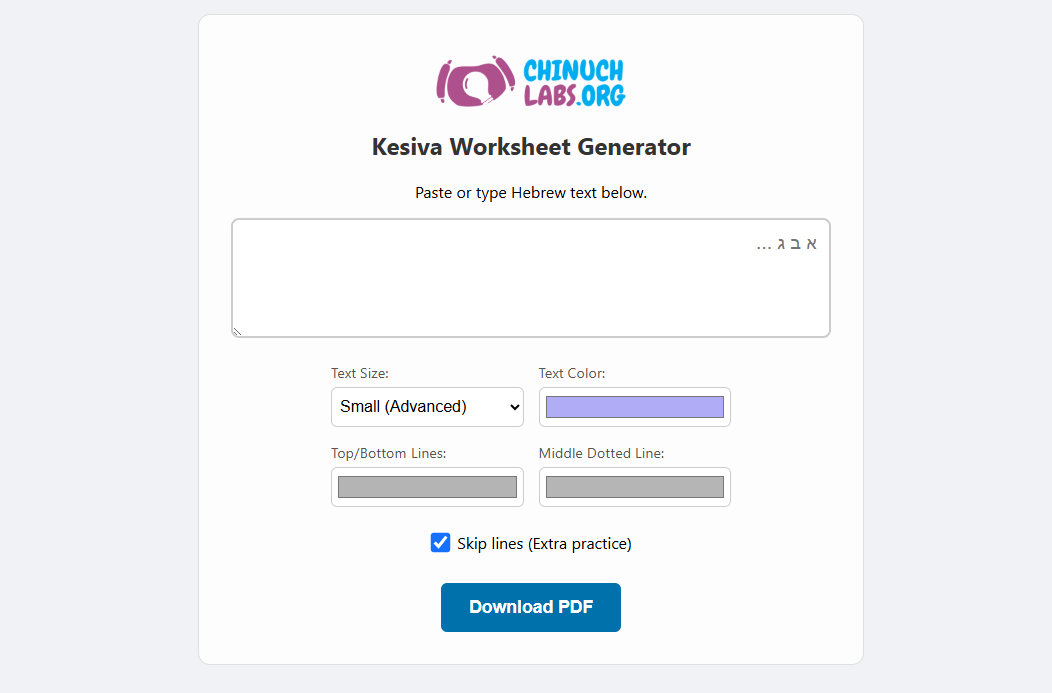
We know that every student is different, so we designed this app to be completely adaptive. You don’t have to settle for “one size fits all” PDFs anymore. You can tailor every aspect of the practice sheet to meet your specific needs:
- Three Sizes for Every Stage: Choose from Large (for beginners), Medium (standard practice), or Small (for advanced students).
- Copywork or Tracing: Toggle “Skip Lines” to leave a blank row for students to practice writing on their own after tracing.
- Respects Manual Line Breaks: If you want a specific phrase on a specific line, just hit “Enter”—the app respects your manual formatting.
- Endless Pages: Whether you’re practicing a single word or an entire posuk, the app automatically generates as many pages as needed to fit your text.
Make It Your Own
You can now customize the visual experience to help students focus better:
- Custom Colors: Change the color of the tracing letters, the solid top/bottom lines, and even the middle dotted line to create high-contrast or low-distraction sheets.
- Built-in Instructions: The PDF automatically includes clear, student-friendly instructions in English to guide their practice.
How to Use It:
- Type or Paste your Hebrew text into the box.
- Select your size and choose your preferred colors.
- Toggle “Skip Lines” if you want to include blank practice rows.
- Click Download PDF and print!
We are excited to see how this tool helps your students grow in their Kesiva skills. Head over to the generator page and try it out today!


